Exclusively serving accounting firms and bookkeepers in Belgium & the EU · Book a free audit →
Projects

Automations built.
Problems solved.

A selection of AI workflow automations built for accounting firms — showing what gets automated, how it works, and what it changes. Every project is labelled so you know exactly what stage it is at.

Live — deployed at a real firm
Proof of Concept — fully functional demo
4 projects
Automated reporting dashboard
Proof of Concept 02 Automated Reporting

Monthly Management
Report Generator

A reporting automation that pulls transaction data from Google Sheets on the 1st of each month, structures it with AI, generates a branded PDF summary, and emails it to the designated partner — no manual work involved.

~6hSaved per month
1stAuto-delivered
n8nGemini APIGoogle SheetsGmail API
Deadline calendar compliance
Proof of Concept 03 Compliance Monitoring

VAT Deadline
Monitor & Alert

A compliance automation that tracks VAT filing periods and statutory deadlines for every client in a Google Sheet. Every weekday morning it checks what is due in the next 7 days and fires a Slack alert to the responsible accountant.

0Missed deadlines
08:30Daily alert
n8nGoogle SheetsSlack APIClaude AI
Client document collection workflow
Proof of Concept 04 Document Collection

Client Document
Collection Workflow

An automation that sends personalised document-request emails to clients on a configurable schedule, tracks which documents have been received, and escalates overdue requests to Slack without any manual follow-up needed.

3×Faster collection
100%Auto-tracked
n8nGmail APIGoogle SheetsSlack API

See something that fits
your firm's situation?

Book a free 60-minute workflow audit. We map your firm's processes and show you exactly which automations would save the most time — with a written report and fixed-price quote.

Book a free audit View services →
Email Triage Automation
Live Inbox Automation · Belgium

Email Triage & Invoice
Processing Automation

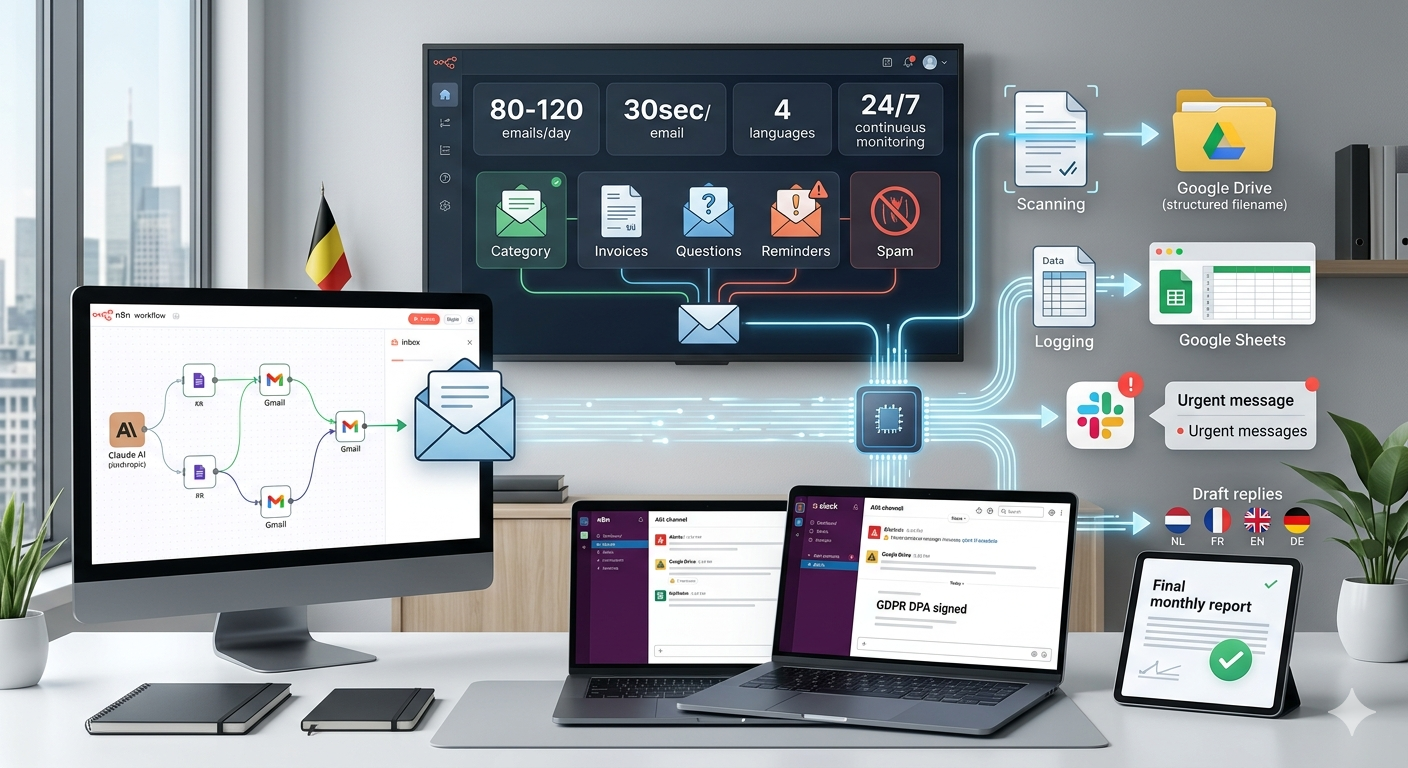
An accounting firm receiving 80–120 emails per day — invoices, client questions, urgent reminders, and spam — processed entirely automatically. Every email classified, filed, and acted on within 30 seconds, 24 hours a day.

0minManual inbox sorting
30secPer email processed
4langLanguages handled
24/7Continuous monitoring

A firm drowning in its own inbox

A Belgian accounting firm with 14 staff was spending an estimated 2–3 hours per day collectively on inbox management: sorting invoices into folders, forwarding urgent messages, replying to routine client questions, and manually checking for overdue payments. Important emails were occasionally missed. Phishing attempts were a growing concern. Nothing was tracked or logged.

What was happening before

Invoices manually downloaded, renamed, and moved to client folders — one by one
Urgent payment reminders sitting unread until someone noticed them
Client questions in Dutch, French, and English requiring manual drafting
No audit trail — no record of when an email arrived or what was done with it
Phishing emails occasionally forwarded internally before anyone realised

The automation, step by step

1

Inbox check every 5 minutes

The n8n workflow polls Gmail via the Google API every 5 minutes, 24/7. Each unprocessed email is queued for classification.

2

AI classification with confidence scoring

Claude AI classifies each email into one of five categories: Invoice, Question, Reminder, Spam/Phishing, or Other. If confidence is below 80%, a Slack alert is sent for human review.

3

Invoice extraction and filing

For invoices: the PDF is parsed, key fields extracted (supplier, amount, VAT, due date, IBAN), the file is saved to the client's Google Drive folder with a structured filename, and the data is logged to the master spreadsheet.

4

Draft replies for client questions

Language is detected automatically. Claude generates a professional draft reply in Dutch, French, English, or German and creates it as a Gmail draft — ready to send with one click.

5

Escalation and labeling

Reminders and urgent emails trigger immediate Slack alerts. Phishing attempts are archived and flagged with a high-priority alert. Every email gets a Gmail label.

6

Client onboarding and logging

First-time clients have a Drive folder, Slack channel, and Sheets record created automatically. Every processed email is logged with category, confidence score, and action taken.

"We haven't touched our invoice folder manually since this went live. The Slack alerts mean nothing urgent falls through anymore — and the monthly report just appears in our inbox on the first of each month."

Managing Partner · Accounting firm · Belgium · 14 staff  ·  Name withheld at client's request

What it's built on

n8n (self-hosted) Claude AI (Anthropic) Gmail API (OAuth2) Google Drive API Google Sheets API Slack API Hetzner Cloud (hosting) GDPR DPA signed
Get this automation for your firm View full service details →
Automated Reporting
Proof of Concept Automated Reporting

Monthly Management
Report Generator

A reporting automation that runs on the 1st of every month: pulls structured transaction data from Google Sheets, uses AI to generate a narrative management summary, and emails a formatted report to the firm's partners — without anyone triggering it.

~6hSaved per month
1stAuto-delivered monthly
0Manual formatting
100%Consistent output

Month-end reporting as a recurring burden

In most accounting firms, the monthly management report is built the same way every single month: export data from the accounting system, paste it into Excel, format tables, write a commentary, adjust the layout, and email it to partners or clients. It takes 4–8 hours and almost always lands late.

This PoC demonstrates how that entire process can run automatically — triggered by a scheduled workflow, not a person.

The automation, step by step

1

Scheduled trigger on the 1st

At 06:00 on the first of every month, the n8n workflow activates and reads the previous month's transaction data from the designated Google Sheet.

2

Data structuring and validation

The workflow checks data completeness, flags missing entries, and structures the data into the reporting schema before passing it to the AI layer.

3

AI-generated narrative summary

Gemini API generates a concise management commentary: key trends, notable variances, top expense categories, and a brief outlook — written in plain language, not accounting jargon.

4

Report assembly and delivery

The formatted report is compiled and emailed to the designated recipients. A copy is saved to Google Drive. A Slack notification confirms successful delivery.

What it's built on

n8n (self-hosted) Gemini API (Google) Google Sheets API Gmail API Google Drive API Slack API
Discuss this for your firm
VAT Deadline Monitor
Proof of Concept Compliance Monitoring · Belgium

VAT Deadline Monitor
& Alert System

A compliance automation that monitors VAT filing deadlines and statutory obligations for every client in a Google Sheet — and sends a targeted Slack alert to the responsible accountant every weekday morning at 08:30.

0Missed deadlines
08:30Daily Slack alert
7dayAdvance warning
Clients tracked

Deadlines tracked in spreadsheets, remembered by people

In most accounting firms, VAT deadlines and statutory filing obligations live in a shared spreadsheet that someone has to check manually. When things get busy — and they always do at quarter-end — deadlines slip. Penalties follow. This PoC replaces the "someone should check" with an automated system that always checks.

The automation, step by step

1

Daily trigger at 08:25

Every weekday morning, the n8n workflow reads the client deadline spreadsheet in Google Sheets.

2

Deadline proximity check

The workflow calculates which deadlines fall within the next 7 days, 3 days, and 1 day — each triggering a different alert priority level.

3

AI-generated alert context

Claude AI adds a short contextual note to each alert — what filing is due, which client, and what documents are typically needed — so the accountant knows immediately what to do.

4

Personalised Slack delivery

Alerts are routed to the Slack channel of the responsible accountant. Critical deadlines (≤1 day) also trigger a direct message. The spreadsheet is updated with an "alerted" timestamp.

What it's built on

n8n (self-hosted) Claude AI (Anthropic) Google Sheets API Slack API
Discuss this for your firm
Document Collection Workflow
Proof of Concept Document Collection

Client Document
Collection Workflow

An automation that replaces the manual process of chasing clients for outstanding documents. Personalised reminder emails are sent automatically, incoming documents are classified and filed, and missing items escalate to Slack — without anyone following up manually.

3×Faster collection
0Manual follow-ups
100%Receipt tracked
AutoFiled on arrival

Chasing clients takes more time than the actual work

Gathering documents from clients — bank statements, purchase invoices, expense receipts — is one of the most time-consuming and frustrating tasks in an accounting firm. Emails get sent, ignored, resent. The accountant remembers to follow up on some clients but not others. Documents arrive in different formats, with inconsistent names, and sit in the inbox until someone manually moves them.

This PoC automates the entire cycle: request, remind, receive, classify, file.

The automation, step by step

1

Scheduled document request

On a configured date each month, personalised emails are sent to each client listing the specific documents required for their file — in their own language.

2

Incoming document detection

When a client replies with attachments, the email triage system detects it, classifies the document type, renames the file using a structured convention, and saves it to the client's Google Drive folder.

3

Tracking sheet updated

The Google Sheet tracking which clients have submitted which documents is updated automatically. The responsible accountant sees real-time status without checking their inbox.

4

Escalation for non-responders

Clients who haven't submitted by a configurable deadline receive a second reminder automatically. If still outstanding after the final deadline, a Slack alert goes to the accountant for personal follow-up.

What it's built on

n8n (self-hosted) Gmail API (OAuth2) Google Drive API Google Sheets API Slack API Claude AI (classification)
Discuss this for your firm